Security Considerations When Automating Business Processes with AI
Automating business processes with AI delivers real speed gains, but AI automation security is the part most teams skip until something breaks. Lock down data access, permission models, and audit trails before you ship any automation. This post covers the real risks, a practical framework, and what secure implementation actually looks like.
The Real Risk: What Breaks When AI Automation Runs Loose
Unsecured AI automation doesn't fail quietly. It routes customer data to the wrong systems, accumulates credentials it was never supposed to have, and leaves no record of what it changed or why. By the time you notice, the damage is already distributed across thousands of records.
Here's what the failure modes actually look like in production:
- An AI agent routing support tickets also has read access to billing records because someone gave it a broad API key during setup. Nobody noticed for eight months.
- An automation that approves refunds runs overnight, processes 400 requests, and there's no log entry explaining which rule triggered each decision.
- A third-party AI Chatbot & Virtual Assistant gets integrated without checking the vendor's data retention policy. Customer conversations, including account numbers and personal details, are being stored on external servers.
Permission creep is the most common culprit. An automation gets credentials for "just one task" and ends up touching five systems. Each new connection is another surface area for a breach, a compliance violation, or a data leak you can't reconstruct after the fact.
Why AI Automation Security Matters More Now
AI automation security has moved from a "nice to have" into something regulators actively audit. The scale and speed of AI systems mean that a single misconfiguration can affect a million records faster than a human team could catch it.
The regulatory landscape has caught up. SOC 2 Type II compliance now explicitly covers how automated systems access and handle data. GDPR, HIPAA, and ISO 27001 Information Security Management all require organisations to demonstrate that automated decision-making is logged, controlled, and reversible. A manual process that went wrong used to affect one customer at a time. An automation that goes wrong affects everyone in the queue simultaneously.
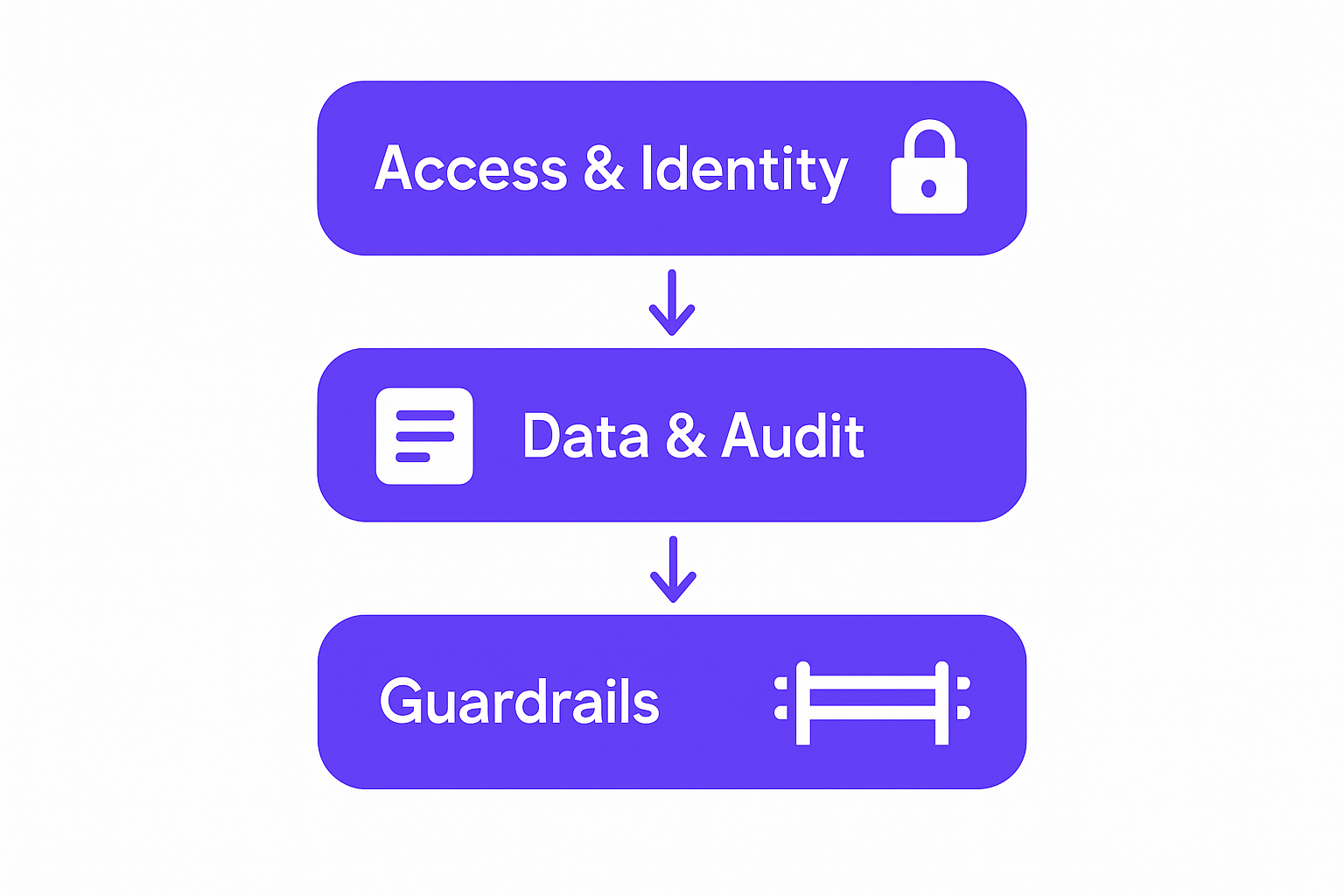
Three-layer security framework for AI automation: access control, audit trail, behavioral guardrails
Third-party AI tools add another layer of exposure. OWASP Secure Coding Practices has long documented the risks of over-permissioned service accounts, but most teams don't apply those principles consistently when plugging in AI services. Many popular AI platforms log conversation content by default. Some use it to train future models. Unless you've read the data processing agreement and signed a DPA with explicit restrictions, you may be sending customer data to a model that retains it indefinitely.
The cost of getting this wrong is rising. Fines under GDPR run up to 4% of global annual revenue. HIPAA penalties top out at $1.9 million per violation category per year. Reputational damage from a publicised breach compounds those numbers with customer churn you can't quantify cleanly.
Core Security Framework for AI Automation
A sound AI automation security framework comes down to six principles applied consistently, not just at launch but at every change.
Principle of Least Privilege
Every automation task gets exactly the permissions it needs to complete its job, and nothing else. A lead-routing automation should never have access to payroll. A billing reconciliation job should never have write access to your CRM contacts. You define the minimum viable permission set before you write a single line of integration code.
OWASP Secure Coding Practices frames this clearly: grant access to the specific resource, for the specific operation, and revoke it when the task completes. This isn't about distrust. It's about limiting blast radius when something goes wrong, because something always eventually goes wrong.
Role-Based Access Control (RBAC)
Who can trigger an automation? Who can modify its configuration? Who can read its output? These are distinct roles that should be explicitly assigned and audited. RBAC means that your operations team can view automation logs without being able to change the permission model. Your developers can deploy changes without being able to approve payments.
Comprehensive Audit Logging
Every action an automation takes should produce a log entry with a timestamp, a record of what changed, and context for why it ran. Not just errors. Every action. If an automation reads a customer record, that read gets logged. If it modifies a field, the before and after values are captured.
This isn't bureaucracy. When a compliance auditor asks "show me every time your system accessed patient records in Q2," your answer is either a filtered log export or a very uncomfortable conversation.
Data Encryption and Vendor Vetting
Automations must use TLS for all external API calls, and sensitive fields in your database should be encrypted at rest, not just behind a login. Before connecting any third-party AI tool, verify their SOC 2 Type II certification, review their sub-processor disclosures, and confirm data residency policies. The SOC 2 Type II compliance framework exists precisely to give you an independently audited answer to "is this vendor handling our data responsibly?"
Implementation Patterns: Securing AI Automation in Practice
Getting a security framework from principle to production requires specific architectural decisions made early, before the automation handles real data.

Engineer auditing automation security logs and compliance requirements at a workstation
Isolate Automations in Service Layers
Build each automation as a distinct process with its own restricted database credentials. Never share your primary application API key with an automation. If that shared key is compromised, your entire platform is exposed. When automations run in isolation with their own service accounts, a compromised credential affects only what that specific account can reach.
Staged Rollout with Human Gatekeepers
Not everything should run unattended. A well-designed Business Process & Workflow Automation handles the high-volume, routine work automatically, but routes exceptions and high-stakes actions to a human approval step. An invoice approval automation can process 200 routine invoices overnight without human review. The 12 that hit exception rules wait in a queue for a person to review before execution.
Immutable Audit Trails
Store logs in append-only systems. A message queue, an append-only database table, or a dedicated log aggregation service where records cannot be modified after writing. If a log can be deleted or edited, it's not an audit trail. It's a document.
Secrets Management
API keys, database passwords, and integration credentials belong in a dedicated secrets vault, such as HashiCorp Vault or AWS Secrets Manager. They do not belong in environment variables committed to a repository, in a shared Notion doc, or hardcoded in application config files. Every environment (development, staging, production) gets its own set of credentials with different permission levels. A developer's local environment should never have access to production customer data.
Audit Your Automation Security Today
Common Security Pitfalls That Sink Automation Projects
Most automation security failures aren't exotic. They're predictable patterns that appear on nearly every post-breach review.
Shared admin credentials are the most common. One API key or database user gets given to multiple automations because it's convenient. Then something breaks, and you have no way to trace which automation caused it, because they all look identical in the logs.
No approval workflows for sensitive changes is the second one. An automation that approves invoices, grants user access, or processes refunds without any human verification step is running with consequences it can't undo and no oversight to catch a runaway condition.
Logging PII in plain text happens more often than it should. An audit trail that captures full names, email addresses, credit card numbers, or medical record IDs in unencrypted logs is a compliance liability and a breach waiting to happen. Sensitive fields should be redacted or tokenised in logs before they're written.
Overpermissioned integrations are the fourth pattern. Connecting to Salesforce, HubSpot, or your ERP with admin credentials because it was "easier to set up" is not a configuration choice. It's a risk decision made by default. When that integration is exploited, the attacker has admin access to your CRM.
Trusting third-party AI without data agreements closes the list. If you haven't read what a vendor does with the data you send them, you've made a compliance decision without knowing it. Many popular AI services retain conversation data, use it for training, and share it with sub-processors. This is something you need to know before the contract is signed, not after an audit finds it.
How GroovyMark WebX Locks Down Automation Security
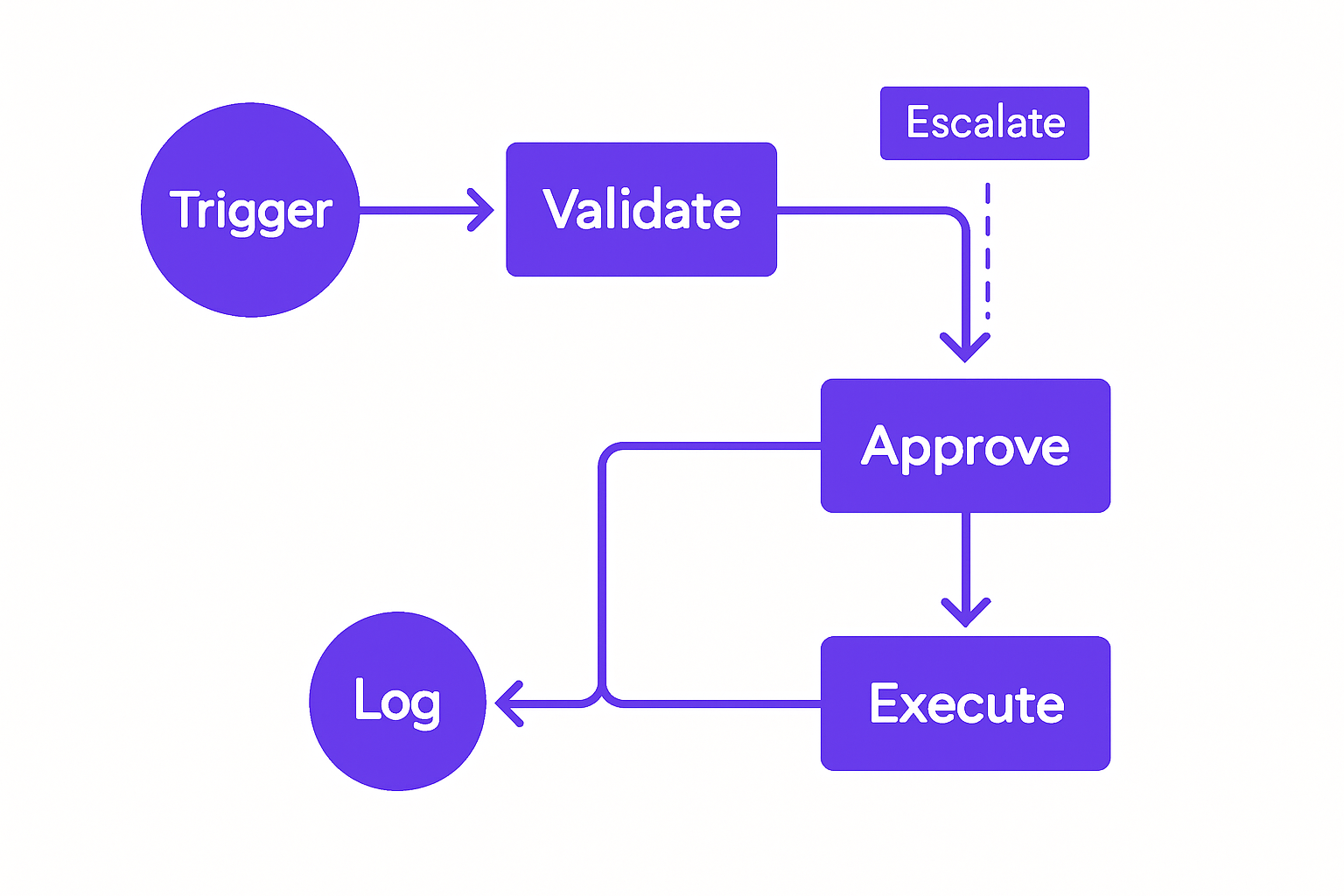
Secure automation workflow with human approval gates and audit logging at each decision point
At GroovyMark WebX, security architecture isn't added after the automation is built. It's baked into the design specification. Every engagement starts with a permission model: who triggers what, what data each process can touch, and what the audit trail looks like before a single integration is connected.
Every automation GroovyMark WebX builds runs on SOC 2 Type II certified infrastructure, independently audited annually, with encryption, access controls, and disaster recovery verified by a third party. Immutable audit logs are included in every build, timestamped, attributed to the specific service account, and stored in append-only infrastructure. Compliance audits and breach investigations have a clear, unalterable record to work from.
Data residency is handled explicitly. Automations for clients in Australia run on Australian servers. US clients keep their data in-region. There's no ambiguity about where data travels, and no surprise sub-processor sharing. Clients running regulated operations in healthcare, finance, or government have specific requirements here, and GroovyMark WebX builds to those requirements by default for regulated industries, not as an add-on.
Every third-party API connected to an automation goes through an integration audit: data retention policies, sub-processor disclosures, TLS enforcement, and rate limiting. If a vendor doesn't meet the bar, we either find an alternative or implement an intermediary layer that prevents sensitive data from reaching them directly.
If you're scaling automation across your operations and want a security review before you go further, get in touch with our team and we'll walk you through what a properly secured automation stack looks like for your industry. You can also view our case studies to see how this has been implemented across SaaS platforms, healthcare portals, and multi-location service businesses.
These aren't theoretical controls. They're the architecture we ship.
Ready to Build Secure Automation?
Frequently asked questions
What happens if an automation runs with admin credentials and something goes wrong?
If an automation has admin-level access, a single bug or misconfiguration can affect thousands of records or users before you catch it. That's why GroovyMark WebX enforces least-privilege architecture from the start—every automation gets only the permissions it needs. If something breaks, the blast radius is contained, and audit logs show exactly what changed and when.
How do we ensure our AI chatbot doesn't log sensitive customer data?
Audit the AI vendor's data retention and training policies explicitly in your contract—many popular AI services log conversations by default and may use them for model improvement. GroovyMark WebX implements data redaction and field-level encryption for chatbots, so sensitive information (credit cards, SSNs, medical data) is never visible to the underlying AI model or stored in unencrypted logs.
Do we need approval workflows for every automation decision?
Not for everything—high-volume, low-risk tasks (e.g., tagging leads, sending notifications) can run unattended. But any automation that changes state (approves invoices, grants access, refunds money) or touches sensitive data should go through a human approval gate. GroovyMark WebX builds staged workflows where automations handle routine work and escalate exceptions to people for final sign-off.
What's the difference between audit logging and monitoring?
Audit logging is the permanent record of what happened: every action, timestamp, and context. Monitoring is real-time alerting—spotting unusual activity (a thousand API calls in five minutes, failed logins) and raising an alarm. You need both. GroovyMark WebX includes both: immutable audit trails for compliance and 24/7 monitoring for incident detection.
How often should we review who has access to automations?
At minimum quarterly, especially after team changes. If someone leaves the company or changes roles, they should lose access to automations they no longer need. Quarterly reviews help catch overpermissioned accounts before they become a breach vector. GroovyMark WebX's customer portal gives you a complete view of who has access to what, so reviews take hours instead of weeks.