Why Your Product Data Is Rotting In Spreadsheets, And How AI Document Processing Recovers It
AI document processing is the fix for teams drowning in manual data entry from invoices, contracts, and order forms. This post explains exactly how the technology works, how to deploy it without wrecking your operations, and what a realistic implementation looks like, including the mistakes that kill most projects before they deliver ROI.
The Spreadsheet Trap: Why Manual Data Entry Kills Scaling Teams
Manual data entry from invoices, contracts, and order forms is one of the most expensive operational habits a growing company can have. Your ops team spends 4, 6 hours per day transcribing data that already exists in a document, into a system that should already have it. Every hour spent doing that is an hour not spent on work that actually scales.
The compounding problem is accuracy. One mistyped SKU, one wrong price, one transposed digit in a shipping address, and you've got wrong inventory counts, failed fulfillment, customer refunds, and a support queue that didn't need to exist. McKinsey & Company research on automation adoption shows teams reduce manual document processing labor by 60, 80% when they replace hand-keying with structured automation. The question isn't whether the error rate matters. It's how much damage it's already done.
Spreadsheets become the default because they're fast to start. An ops coordinator opens Excel, builds a template, and for a team of five it actually works. Then you hire more people. You open a second office. You bring on a partner in a different time zone. Suddenly three people are editing three versions of the same file, none of which match your actual system of record. The spreadsheet that saved you at ten employees is the thing actively costing you at thirty.
By the time the data quality problem surfaces, usually during a board review, a failed audit, or a fulfillment crisis, weeks of reliable reporting are already gone. Fixing the data retroactively takes longer than the original entry would have. You're not just behind. You're starting over.
Why This Bottleneck Explodes as You Scale from 15 to 50 People
The math on manual document processing gets brutal as headcount grows. At five people, one ops coordinator handles the flow. At twenty, you hire another. At fifty, you've embedded two full-time salaries into a task that shouldn't require any human attention at all.

Operations team manually processing invoices and order forms at their workstations
The real cost isn't payroll. It's latency. A contract signed on Monday doesn't feed your billing system until Thursday, because the person who processes contracts had three days of invoice backlog first. An invoice arrives Tuesday but doesn't hit the ledger until the following week. Your finance team can't close books on time. Your fulfillment team ships the wrong quantities because the order form data is still sitting in a PDF inbox.
"Your sales team can't see accurate account history because the data is still in a PDF inbox, and the deal they're trying to close depends on that history being right."
Gartner research shows AI document processing will account for 40% of enterprise automation spend by 2025. That's not a trend driven by large enterprises looking for marginal gains. It's driven by mid-size companies hitting exactly this wall: they can't afford to keep hiring people to move data, and they can't afford the errors that come from the people they already have doing it under pressure.
This is where companies start losing deals and customers to competitors who have their operational house in order. The competitor isn't necessarily smarter or better funded. They just stopped doing this manually six months before you did.
How AI Document Processing Actually Works: The Framework
AI document processing replaces the manual chain of capture, read, type, check, and submit with an automated pipeline that does all of it in seconds, with higher accuracy and a full audit trail. The framework has five stages, and understanding all five matters, because most failed deployments skip one of them.
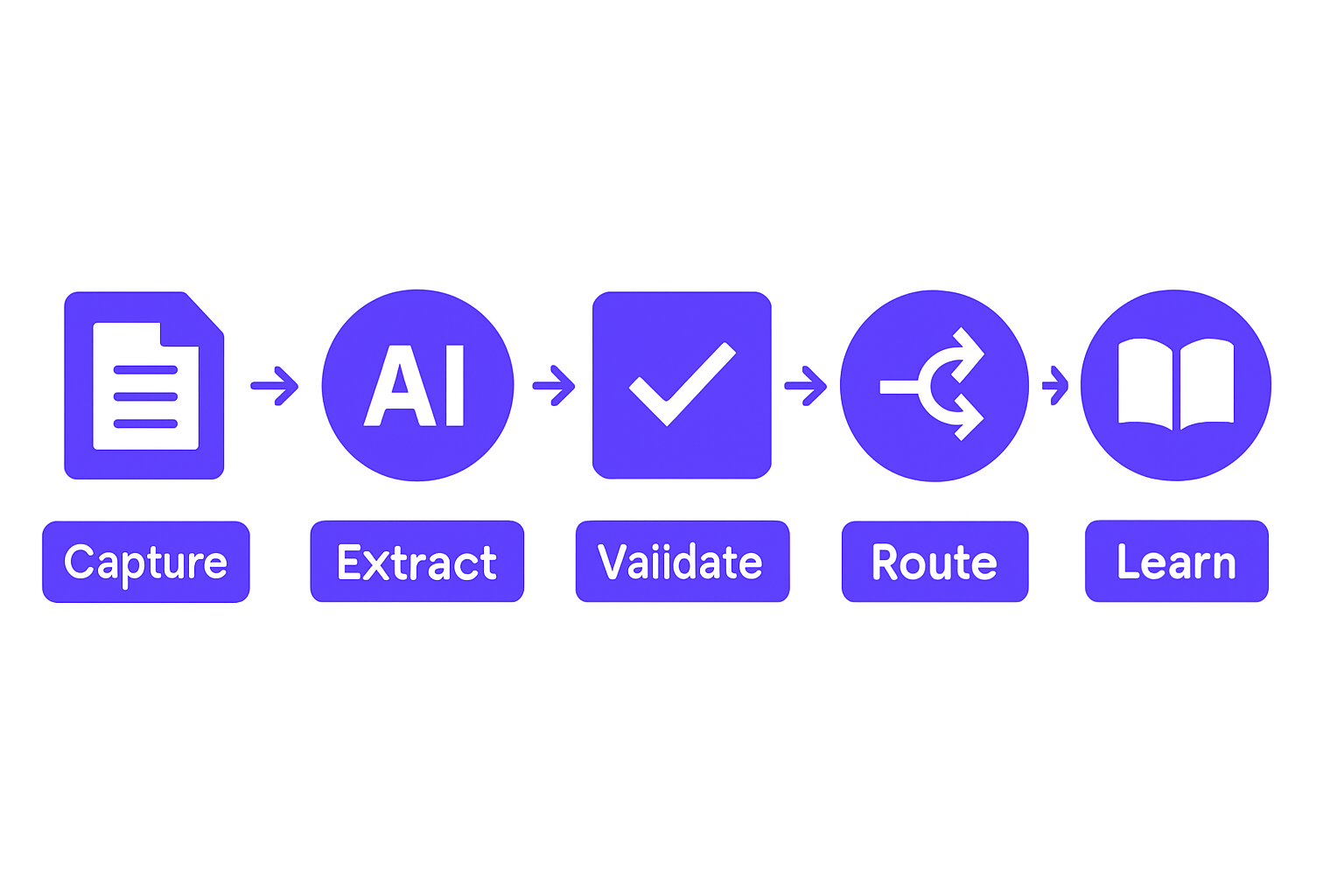
AI document processing workflow pipeline diagram with five sequential stages
Stage 1: Capture and Classify
Documents arrive via email, API, or upload portal. The AI classifies them before a human ever touches them. It knows the difference between an invoice, a purchase order, a contract, and a returns form. That classification determines what extraction rules apply downstream.
Stage 2: Extract
The AI reads every field: line items, amounts, dates, vendor names, account codes, payment terms, GST or VAT amounts, and any custom field your business cares about. This isn't basic optical character recognition. It's trained extraction that understands context, a "Net 30" in a contract means something different than a "30" in a line-item quantity field.
Stage 3: Validate
A rules engine checks extracted data against your business logic. Is this vendor on your approved list? Does this unit price fall within acceptable range? Does this invoice reference a valid PO number? Anomalies are flagged before the data touches your systems. This is where errors get caught, not after they've already cascaded.
Stage 4: Route and Integrate
Clean, validated data flows directly into your ERP, accounting software, inventory system, or custom database. Zero manual handoff. The Workflow Automation layer handles routing logic, so high-value exceptions go to the right approver, and routine invoices post automatically.
Stage 5: Learn and Adapt
The system improves on every document it processes. A vendor who formats their invoices in an unusual layout on month one becomes a known pattern by month three. Edge cases get handled better over time, not worse.
Implementation Patterns: How Teams Actually Deploy This
The most common reason document processing projects stall is that teams try to boil the ocean. They pick a platform, integrate everything at once, and six weeks later nothing is live because the scope is too big and the process mapping is incomplete.
Start narrow. Pick one high-volume document type, invoices are usually the right call. Pull 90 days of historical samples and run the pipeline on that data. You'll surface the edge cases before they're live, and you'll have a concrete ROI number to show your leadership team before you expand.
Wire the output directly. Don't extract data into a new spreadsheet. That's just adding a step. Connect the AI output directly to your accounting software, ERP, or warehouse management system. The goal is zero-touch data flow from document receipt to system of record.
Set sensible thresholds. Decide which extractions flow automatically (invoices under $5,000 from approved vendors) and which require human review (contracts above $50,000, new vendor relationships, amended SKUs). High-confidence extractions bypass approval. Low-confidence ones go into a review queue where a human can clear them in 30 seconds rather than 30 minutes.
Track everything for the first 30 days. Extraction accuracy rates, exception counts, time-from-receipt-to-system. Adjust your validation rules based on what you see. Then measure headcount freed and cycle-time reduction. That's the number you take to your CFO.
Ready to Stop Manual Data Entry? Let's Map Your Process.
Common Pitfalls That Derail Document Processing Projects
Most document processing projects that fail do so for the same five reasons. Knowing them in advance is the difference between a project that delivers in six weeks and one that's still "in progress" six months later.
Picking a tool before mapping your workflow. If you don't know what fields you need extracted or where they go, no platform will save you. Spend a week mapping the current process before you evaluate vendors. It sounds slow. It isn't.
Expecting 100% accuracy on day one. Document processing is a confidence game. Aim for 85, 90% first-pass accuracy with a smart exception queue for the rest. That's still a 10x productivity gain over manual entry, and the accuracy curve improves as the model learns your document set.
Failing to connect the output. Extracted data sitting in a CSV is just a slower spreadsheet. The entire point of AI Document Processing is zero-touch data flow. If you're still exporting to an intermediate file, you haven't finished the job.
Ignoring vendor variability. A single vendor may send invoices in five different formats across a 12-month period. The AI needs to handle all of them. Test with real samples from your actual vendor pool before you go live. Not demo documents. Your documents.
Underestimating the people side. Your ops team has been doing this job manually for two years. Some of them will resist a system that replaces that workflow. Show them the time audit: "You spend 22 hours a week on this. Once this runs, you spend two hours reviewing exceptions." That conversation changes the room.
How GroovyMark WebX Handles Document Processing at Scale
GroovyMark WebX designs extraction rules and validation logic specific to your operation. Your vendor list. Your line-item structure. Your compliance requirements and approval thresholds. Nothing generic, nothing borrowed from a prior client's configuration.

Warehouse operations team using integrated systems to manage inventory and order fulfillment
The AI is trained on your historical documents from day one, so it learns your vendor formats, your edge cases, and your approval workflows before it processes its first live document. That matters because the biggest source of extraction errors in early deployments is variance between training data and real-world inputs. We eliminate that gap by using your real data to build the model.
We integrate directly into your existing systems: QuickBooks, SAP, NetSuite, Salesforce, and custom ERPs. Not into an intermediate tool that adds another layer between document and system. Our case studies show that one manufacturing client cut invoice processing time by 75% and eliminated a full-time AP coordinator within six months, you can read that and others in our case studies.
If you want to know where the biggest time and accuracy use is in your current document flow, Book a consultation and we'll audit your current process and map out exactly where automation applies and where it doesn't. No pitch. Just the honest assessment of what the data recovery roadmap looks like for your operation.
Every engagement comes with lifetime bug-free support and on-time delivery guaranteed. We've maintained a 98% client retention rate because we measure success in operational outcomes, hours recovered, error rates eliminated, headcount redeployed, not in deliverables handed over.
This problem is solvable. The data you need is already in those documents. The only question is how much longer you're willing to pay someone to type it in by hand. GroovyMark WebX builds the pipeline that makes that question irrelevant.
See Your Document Recovery Roadmap in Action
Frequently asked questions
How accurate is AI document extraction compared to manual data entry?
Modern AI achieves 85–95% first-pass accuracy on structured fields (amounts, dates, vendor names, line items) when trained on your document set. The remaining 5–15% flag for quick human review. Compare that to manual entry, which typically introduces 2–5% errors that cascade through your systems. GroovyMark WebX configures extraction rules specific to your vendors and document types, so accuracy improves with every processed document.
Can AI document processing integrate with our existing accounting software?
Yes. We build direct integrations into QuickBooks, Xero, Netsuite, SAP, and any system with an API. Data flows from extracted documents directly into your ledger, inventory system, or CRM without intermediate steps. If you use a custom ERP, we integrate there too. GroovyMark WebX handles the full integration—no manual exports or re-keying required.
What if we have invoices from hundreds of different vendors with different formats?
That's the core strength of AI document processing. Unlike rules-based extraction, machine learning adapts to vendor variability automatically. One vendor may list line items vertically, another horizontally; one uses currency symbols, another doesn't. The AI learns all of it. GroovyMark WebX trains the model on samples from your real vendor pool, so edge cases are handled before you go live.
How long does it take to implement document processing?
Implementation typically takes 2–4 weeks from kickoff to live processing. We start by auditing your current document flow, then build extraction rules and validation logic, test with historical data, and integrate into your systems. The timeline depends on system complexity and data quality. GroovyMark WebX provides a clear roadmap and milestones upfront—and we guarantee on-time delivery.
What happens to documents that fail extraction or validation?
Exceptions land in a human review queue, prioritized by risk (high-value documents or anomalies move to the front). Your team reviews and corrects them in seconds, not minutes. The AI learns from corrections, so similar documents process correctly next time. This creates a virtuous cycle: fewer exceptions over time, lower review overhead, and improving data quality. GroovyMark WebX sets up the exception queue and reporting so you never lose visibility into failures.